DeepSeek R1’s Code Redirection: What You Need to Know
In our tests, DeepSeek R1 did not display full generated scripts itself. Its “Full Updated Script” link pointed to a GitHub Gist URL, so code can end up on third-party hosting and, unless the Gist is secret, be publicly accessible. The placeholder account “yourusername” on GitHub also turned out to exist.
WebThreat Research · Published · 2 min read

Understanding DeepSeek’s “Full Updated Script” Feature
DeepSeek R1, the AI coding assistant promising AI-generated coding, appears to have a design choice that could impact security and privacy. Recent tests indicate that DeepSeek does NOT host generated scripts itself. Instead, it redirects users to GitHub Gist to retrieve their code.
The Findings
Our analysis shows that DeepSeek R1 does not natively display the full script output. Instead, it provides a Pastebin-style external link pointing to GitHub Gist (https://gist.github.com/yourusername/...). This means:
- Your AI-generated code is not private. Unless explicitly set to “Secret,” Gist can make your script publicly accessible.
- Security concerns arise. If DeepSeek users assume their generated scripts are internal, they may unknowingly expose sensitive information.
- DeepSeek is relying on third-party hosting. This impacts the platform’s reliability as a self-contained AI coding assistant.
Here’s the screenshot showing the GitHub Gist link in DeepSeek’s UI:

As seen in the screenshot, the “Full Updated Script” hyperlink is actually a GitHub Gist URL, confirming that DeepSeek doesn’t natively host its AI-generated scripts.
Additional Concern: The “yourusername” account on GitHub already exists, meaning this is not just a placeholder but an actual user’s account. This raises questions about how DeepSeek is managing script links and whether it’s assigning existing accounts unintentionally.
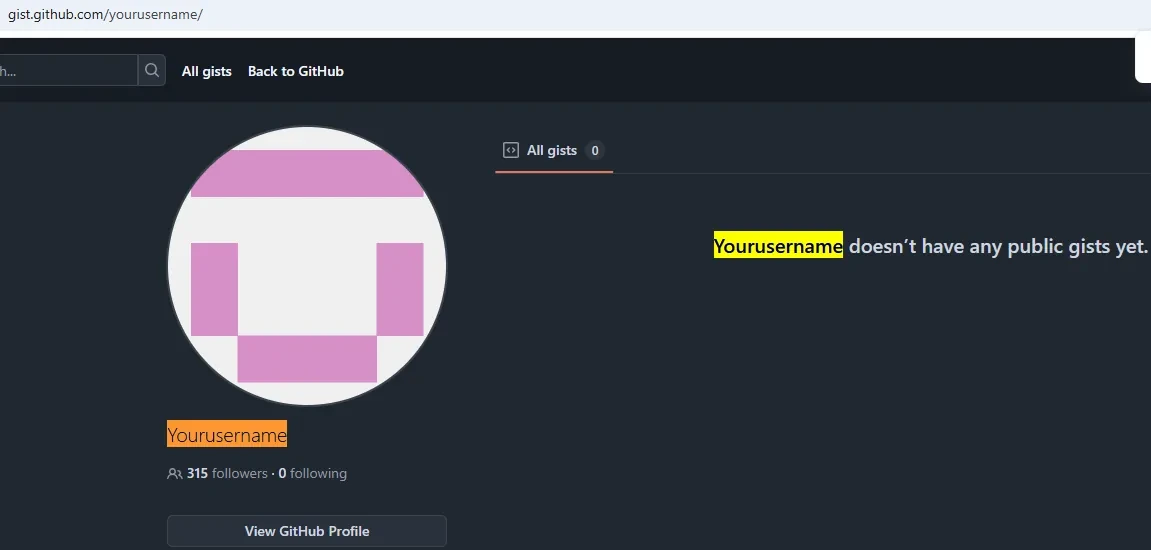
What This Means for Developers
If you’re using DeepSeek R1 for AI-generated code, be mindful when handling sensitive data. Before sharing or using generated scripts, verify if the link is private or publicly accessible.
The Big Question: Why Is DeepSeek Doing This?
There are two possible explanations:
- Technical Limitation: DeepSeek might not have an internal hosting system for generated scripts.
- Intentional Design Choice: It could be offloading storage to GitHub Gist to avoid infrastructure costs.
Regardless, users deserve transparency. DeepSeek should clearly inform users that their scripts are being externally hosted.
Conclusion
DeepSeek R1’s reliance on GitHub Gist for generated scripts introduces privacy considerations and security implications. While AI-assisted coding is a valuable tool, users need to know where their code is actually being stored.
If you’re using DeepSeek R1, check your generated script links. Your code might not be as private as you think.
First published on Medium on 30 January 2025.
Sources
- GitHub Gist profile “yourusername”, GitHub, accessed
Related
Methodology and data
Introducing NS Record Exploiter: A Free, Open-Source Toolkit for DNS Misconfiguration Detection
NS Record Exploiter is a free, open-source Python script. It reads a list of domains, resolves their NS records with dnspython and checks each nameserver domain...
Methodology and data
One Typo Away from Disaster: The Unseen Threat of NS Record Exploitation
A single mistyped nameserver, such as a22-65.akam.ne instead of akam.net, can let an attacker who registers that domain intercept traffic for a subdomain. A Mas...
Stolen-data ecosystem and actors
php2shell: the two critical PHP flaws and what to do now
php2shell is the name for two critical flaws in the PHP runtime, CVE-2026-109618 and CVE-2026-109619, both rated CVSS v4.0 9.2. They can allow unauthenticated r...
See your leadership's exposure
CEM finds your executives from your company name, checks them against breach corpora and leak databases, and scores each person from 0 to 100.